Analog Output (PWM)
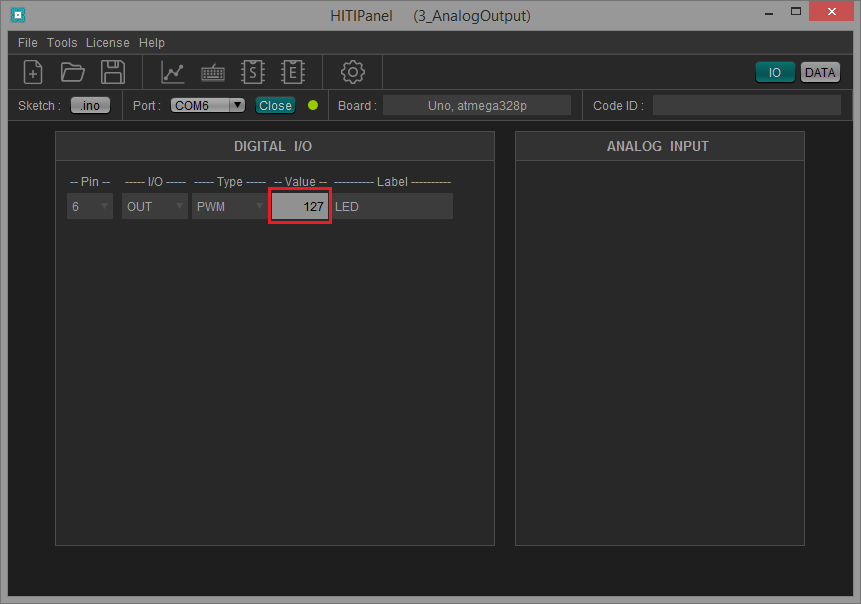
This example shows how to use the I/O Control Panels to control an analog output (a LED on pin 6).
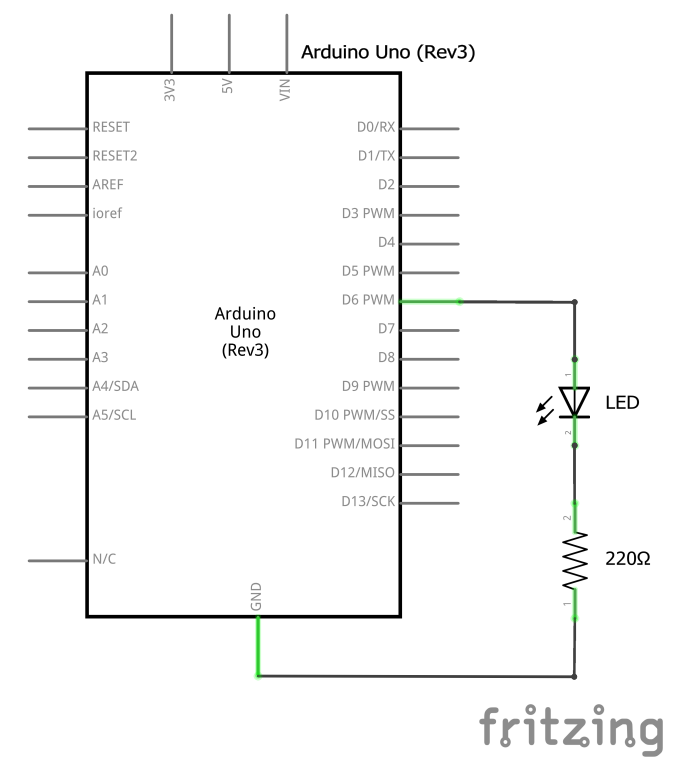
Wiring diagram
Connect a LED on pin 6.
Sketch
In HITIPanel, open this project Example : 1_Basics \ 3_AnalogOutput
In this program, we start by initializing our base library HITIComm with HC_begin().
Then we place HC_communicate() inside the loop() to continuously handle communication between your Arduino and HITIPanel. This function also retrieves in the background the I/O configuration and values.
After, we configure pin 6 as an OUTPUT using pinMode() and we use HC_outputType(pin, type) to inform HITIPanel that this is a PWM output.
Finally, we switch the LED on at start and we set a medium intensity using analogWrite().
#include <HITIComm.h>

const int pin_LED = 6;

void setup()
{
  // initialize library
  HC_begin();

  // set pins mode
  pinMode(pin_LED, OUTPUT);

  // set output type
  HC_outputType(pin_LED, HIGH); // High = PWM, Low = Digital

  // switch ON the LED with medium intensity
  analogWrite (pin_LED, 127);
}

void loop()
{
  // communicate with HITIPanel
  HC_communicate();
}
Control Panels
1) Display the I/O Control Panels (“IO” button).
2) As expected, the analog value is 127, as set in the setup(). Change this value to change the LED intensity.